SouthernWorldwide.com – For frequent travelers, the moment of fumbling for a passport and boarding pass at TSA security is a familiar, often frustrating, experience.
Samsung aims to alleviate this common travel hassle with its latest integration. The tech giant has partnered with CLEAR to introduce Samsung ID with CLEAR, a new feature within Samsung Wallet that allows eligible Galaxy users to use their digital ID for verification at select TSA checkpoints.
This digital ID leverages information from a U.S. passport, offering a potentially seamless way to navigate airport security. However, it also sparks a broader conversation about the extent to which personal identity should be consolidated within a single mobile application.
For those with Apple devices, a similar functionality is available through Apple Wallet. The integration of digital IDs into smartphone wallets is becoming a significant trend in personal identification and convenience.
GOOGLE CHROME AUTOFILL NOW HANDLES IDS
Samsung ID with CLEAR functions as a mobile digital identification stored securely within Samsung Wallet. The system is underpinned by verified U.S. passport information, with CLEAR handling the verification process.
Upon successful approval, users can present their phone at participating TSA checkpoints, eliminating the need to retrieve their physical identification. Samsung indicates that this digital ID can be presented via a simple tap or QR code scan.
This capability could prove invaluable for travelers managing multiple items like carry-on bags, laptops, and beverages, especially in busy airport environments.
Woncheol Chai, EVP and Head of the Digital Wallet Team at Samsung Electronics’ Mobile eXperience Business, stated that the feature is designed to make airport travel and identity verification processes significantly “easier and frictionless” for users.
It is crucial to note, however, that this digital ID does not negate the need to carry a physical passport or a REAL ID-compliant document. Travelers should always keep their physical identification readily accessible, as TSA may require it, or certain checkpoints might not yet support digital ID verification.
Currently, Samsung ID with CLEAR has several limitations. The feature is exclusively available to U.S. passport holders and is operational only at specific TSA checkpoints equipped for digital ID verification.
To utilize Samsung Wallet, users require a compatible Samsung smartphone running Android 9.0 or a later version, along with a Samsung account. The actual availability of the feature can still be contingent on the specific phone model, airport, and the presence of compatible TSA readers.
Read more : EU Sanctions Reveal Antisemitism Behind a 'Socially Acceptable Mask,' Says Israeli Official
Therefore, it is advisable not to assume that all TSA lanes will accept this digital ID. Travelers should actively look for checkpoints that explicitly support digital ID verification before relying solely on their Galaxy phone.
1 BILLION IDENTITY RECORDS EXPOSED IN ID VERIFICATION DATA LEAK
Samsung outlines the following steps for adding Samsung ID with CLEAR to Samsung Wallet:
CLEAR undertakes the verification of U.S. passports that are added to Samsung Wallet. Subsequently, Samsung Wallet securely stores the resulting digital ID on the user’s device.
Once the Samsung ID with CLEAR has been approved, it can be used at designated TSA checkpoints. Both Samsung and CLEAR confirm that travelers can present this digital ID through a tap or a QR code scan.
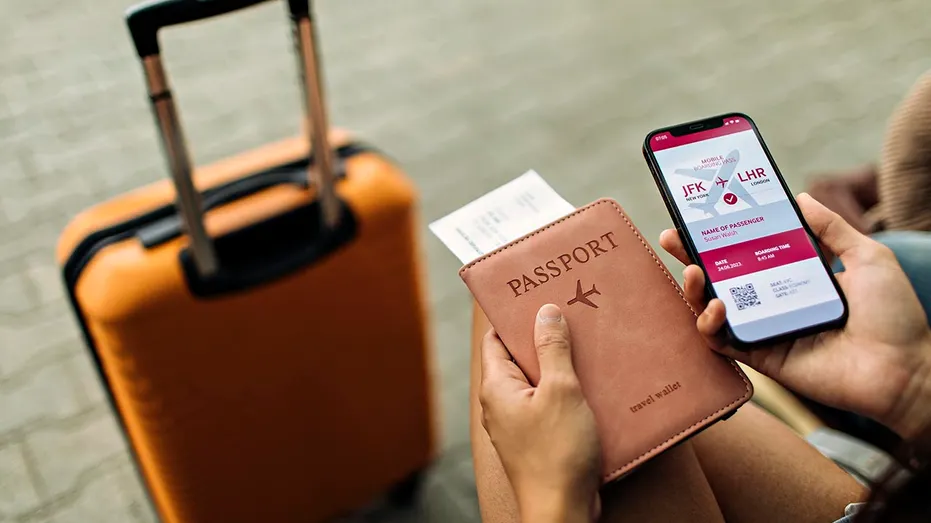
This means that travelers might be able to keep their physical passports stored in their bags while passing through airport security. Nevertheless, Samsung emphasizes that the feature is limited to select TSA checkpoints that are equipped with compatible TSA reader machines. Additionally, a boarding pass might still be necessary for identity verification at the checkpoint.
Consequently, the most prudent approach is to leverage the phone for convenience while ensuring a backup physical ID remains readily accessible.
BIOMETRIC IRIS SCANNING LAUNCHES IN US CITIES FOR DIGITAL IDENTITY
Samsung has announced that Samsung Wallet now supports passports, travel-related verifications, age-21+ checks, and other government use cases through its integration with CLEAR. The company also notes that Samsung ID with CLEAR can be utilized at select sporting venues, including BMO Stadium in Los Angeles.
Samsung is not the sole technology provider venturing into this domain. Apple Wallet and Google Wallet also offer support for passport-based digital IDs for domestic TSA checks at select airports. The distinct advantage of Samsung’s implementation lies in its utilization of CLEAR for identity verification and the storage of the credential within Samsung Wallet.
This integration has the potential to expedite entry processes at venues and age verification checks. Instead of presenting a physical driver’s license or passport, users may be able to verify their identity directly from their smartphones.
This evolution marks a significant development in the competitive landscape of digital wallets. Smartphones are increasingly becoming central hubs for various personal credentials, including payment cards, tickets, boarding passes, digital keys, and loyalty cards, with identity now being added to this list.
Samsung states that Samsung ID with CLEAR requires fingerprint or PIN access for security. The company also highlights the role of Samsung Knox in safeguarding the digital ID on Galaxy devices, ensuring that identity information is encrypted directly on the device.
These security measures are intended to instill confidence in users. However, it is important to acknowledge that enhanced convenience often involves certain trade-offs.
A digital ID can reduce the frequency with which one needs to handle their physical passport. It can also decrease the likelihood of misplacing one’s ID at checkpoints, bars, or stadium counters.
Conversely, the importance and reliance on the smartphone increase substantially. Should the device be lost, damaged, locked, or its battery depleted, users will require alternative methods to establish their identity.
Settings may vary depending on your Android phone’s manufacturer
Before proceeding with adding your passport to Samsung Wallet, it is essential to ensure that your phone and the Samsung Wallet application are up-to-date. On your Galaxy phone, navigate to Settings → Software update → Download and install. To update Samsung Wallet, open the Galaxy Store or Google Play Store, search for Samsung Wallet, and tap Update if available.
Furthermore, it is critical to fortify the security of your Samsung account. Go to Settings → tap your Samsung account name at the top → Security and privacy → Two-step verification and confirm that it is enabled.
Employ fingerprint authentication or a robust PIN for device access. To verify this setting, navigate to Settings → Security and privacy → Lock screen → Screen lock type, and select a strong unlocking method. Avoid predictable PINs such as birthdays, repeated numbers, or your street address.
11 EASY WAYS TO PROTECT YOUR ONLINE PRIVACY IN 2025
It is also recommended to keep your physical passport or REAL ID-compliant document in a secure compartment of your bag. This provides a reliable fallback option in instances where a TSA reader is unavailable or your phone experiences a malfunction.
Finally, regularly review the contents stored within Samsung Wallet. Open Samsung Wallet → tap All → review your cards, passes, IDs, and keys. While digital wallets offer significant utility, they should not become a repository for every credential one possesses, akin to a disorganized drawer.
Samsung ID with CLEAR has the potential to make the travel experience less stressful. For frequent travelers, the appeal is evident: their phone is already in hand, their bags are likely full, and the TSA line is rarely the ideal place to search for documents. However, this innovation extends beyond airport convenience. As your phone increasingly serves as your wallet, key holder, boarding pass, and ID repository, its protection becomes paramount, positioning it as the central element of your digital life. While digital IDs may soon become commonplace, for the present, Samsung ID with CLEAR offers a valuable convenience, but your physical passport still warrants a secure place in your luggage.
Would you entrust your phone to serve as your primary identification at the airport, or does granting a single device such extensive control over your life seem concerning? Share your thoughts by contacting us at Cyberguy.com.